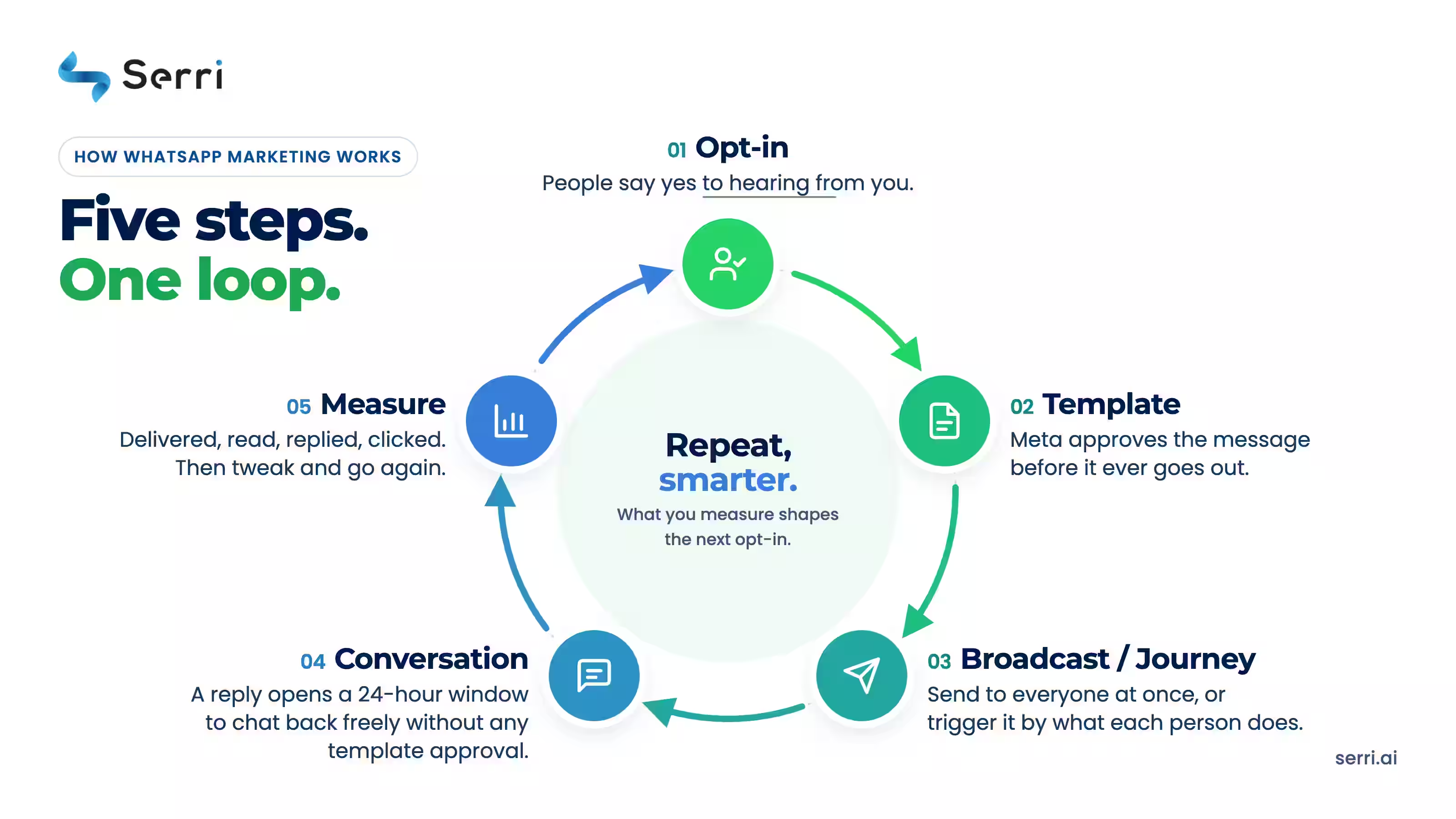
WhatsApp marketing is permission-based, one-to-one customer communication at scale. Businesses collect explicit opt-in consent, send Meta-approved message templates through the WhatsApp Business Platform (API), and drive the full lifecycle — acquisition, conversion, retention, and win-back — through two-way conversations, not one-way blasts. You pay Meta per delivered message, and conversations started from Click-to-WhatsApp ads get an extended free messaging window — making ads the cheapest way into the channel. Meta’s strict opt-in rules aren’t obstacles; they’re why WhatsApp stays uncluttered and effective.
How Does WhatsApp Marketing Work? The Complete 2026 Guide
Who This Is For: Businesses, marketing teams, and service organisations whose customers already live on WhatsApp, from e-commerce and retail to banking, education, healthcare, travel, and SaaS. Not for teams planning to blast scraped lists: WhatsApp punishes spam faster than any channel, and that’s a feature. WhatsApp crossed 3 billion monthly users in 2025, and in markets like India, Brazil, and Southeast Asia it’s the primary communication channel. Here’s how it actually works for marketing
The Three Versions of WhatsApp — Which One Does Marketing Need?
WhatsApp has 2 billion active users globally, and in many markets outside North America, it is the primary communication channel. Customer expectations have shifted: they expect brands to meet them where they already are. WhatsApp marketing delivers higher engagement rates (40 to 80 percent open rates) than email, faster response times than SMS, and richer interactivity than either channel. For businesses with permission-based customer lists, WhatsApp is no longer optional; it is table stakes.
What Are the Three Versions of WhatsApp, and Which One Does Marketing Need?
WhatsApp Messenger (Consumer App)
This is the standard WhatsApp app that 2 billion people use daily. It is not designed for business marketing and violates Meta's terms of service if you use a personal account to send bulk promotional messages. You can use it for one-on-one customer service, but not for campaigns.
WhatsApp Business App
The Business App is designed for small teams (typically under 10 people) managing customer conversations directly. It runs on a single phone number and allows you to set up quick replies, away messages, business hours, and labels to organize conversations. You cannot broadcast to multiple customers or integrate with marketing automation platforms. The Business App is free to download but offers limited scalability.
Use the Business App if you are a local service provider, a small retail shop, or a freelancer managing customer inquiries one-to-one. You cannot run campaigns with it.
WhatsApp Business Platform (API)
The Business Platform is Meta's enterprise solution. It connects to your CRM, marketing automation tools, and customer data platforms via API. It allows you to send broadcast campaigns, automated workflows, rich media messages, and two-way conversations at scale. All marketing campaigns must run through the Business Platform.
Use the Business Platform if you are running any form of marketing campaign, sending automated customer journeys, integrating with your CRM, or scaling beyond a handful of manual conversations per day.
For marketing purposes, you need the WhatsApp Business Platform.

How a WhatsApp Campaign Works, Step by Step
Step 1: Collect Explicit Opt-In Consent
Non-negotiable under Meta policy. Consent must be clear, affirmative (no pre-ticked boxes), documented, and specific to WhatsApp. Collect via checkout checkboxes, Click-to-WhatsApp ads, QR codes, website widgets, or keyword opt-ins.
Step 2: Set Up Your WhatsApp Business API Account (WABA)
Create a Meta Business Account, verify your business, and register a dedicated business number. Through a partner like Serri, onboarding typically takes "10 minutes", not weeks.
Step 3: Create and Submit Message Templates for Meta Approval
Business-initiated messages outside the service window must use pre-approved templates in three categories: Marketing (promotional messages, offers), Utility (order updates, reminders), or Authentication (OTPs). Write with variables — “Hi {{name}}, your order {{id}} ships tomorrow” — approval usually takes minutes to 24 hours.
Step 4: Segment Your Audience and Build Your Campaign
Define who receives your message. Segmentation is where personalization begins. Segment by:
Purchase history (customers who bought product X in the last 30 days)
Engagement level (customers who opened your last 3 emails)
Geographic location (customers in specific regions or countries)
Customer lifecycle stage (new customers, repeat customers, at-risk customers)
Behavior (customers who abandoned their cart, viewed a product, signed up for a waitlist)
Use your CRM or marketing automation platform to query your database and pull the segment. Export the phone numbers and relevant customer data (name, order details, product preferences).
Step 5: Set Up Automated Workflows or Schedule Your Campaign
You have two options: send a one-time broadcast campaign or set up a triggered automated workflow.
One-time broadcast: Schedule a campaign to send to your segment at a specific time. Example: send a Mother's Day promotion to all female customers who purchased in the last year on Tuesday at 10 AM.
Triggered workflow: Set up an automated journey that sends messages based on customer actions. Example: when a customer abandons their cart, send a message immediately, then again 24 hours later, then again 48 hours later with increasing urgency. Or: when a customer completes a purchase, send an order confirmation, then a shipping update, then a delivery notification, then a follow-up survey.
Workflows run 24/7 and scale automatically. They are where WhatsApp marketing becomes truly powerful because you are not managing individual sends; the system responds to customer behavior in real time.
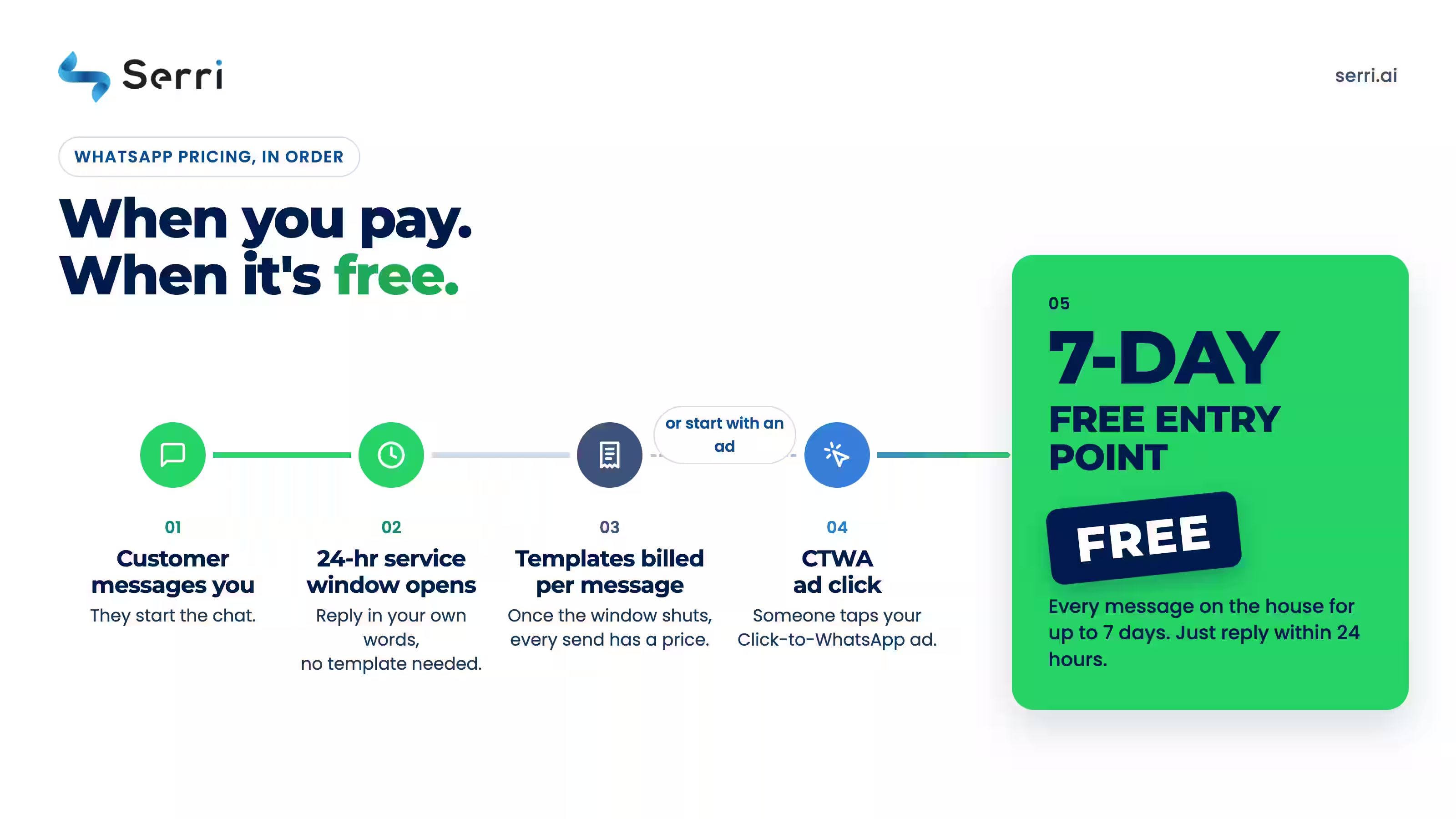
Step 6: Send Your Message Within the 24-Hour Customer Service Window or Incur Per-Message Charges
WhatsApp operates on a 24-hour customer service window. Here is how it works:
If the customer has messaged your business in the last 24 hours, you can send one free message within that 24-hour window.
If the customer has not messaged you, or if 24 hours have passed since their last message, any message you send incurs a per-message charge.
This structure incentivizes two-way conversation, not one-way broadcasting. Businesses that ignore customer replies or send only promotional blasts will rack up costs quickly.
For most marketing campaigns, you will be sending messages outside the 24-hour window and will pay per message. This is expected and budgeted.
Step 7: Enable Two-Way Conversation and Customer Response
When your message arrives, customers can reply. Your team (or a chatbot) must be able to respond. This is where WhatsApp differs from email: it is a conversation channel, not a broadcast channel.
Set up:
A dedicated team inbox or chatbot to receive customer replies
Automated responses for common questions (FAQ bot)
Escalation rules to route complex queries to a human agent
Response time targets (aim for replies within 1 hour)
Poor response times hurt your quality rating and reduce future deliverability.
Step 8: Track Engagement Metrics and Measure Campaign Performance
WhatsApp provides metrics for each campaign:
Delivery rate (percentage of messages successfully delivered)
Read rate (percentage of messages opened)
Reply rate (percentage of customers who replied)
Click-through rate (if your message includes buttons or links)
Opt-out rate (customers who unsubscribed)
Compare these to your benchmarks and to email/SMS performance. Typical WhatsApp open rates range from 40 to 80 percent; typical reply rates range from 5 to 15 percent.
What Can You Send With WhatsApp Marketing? (Use Cases)
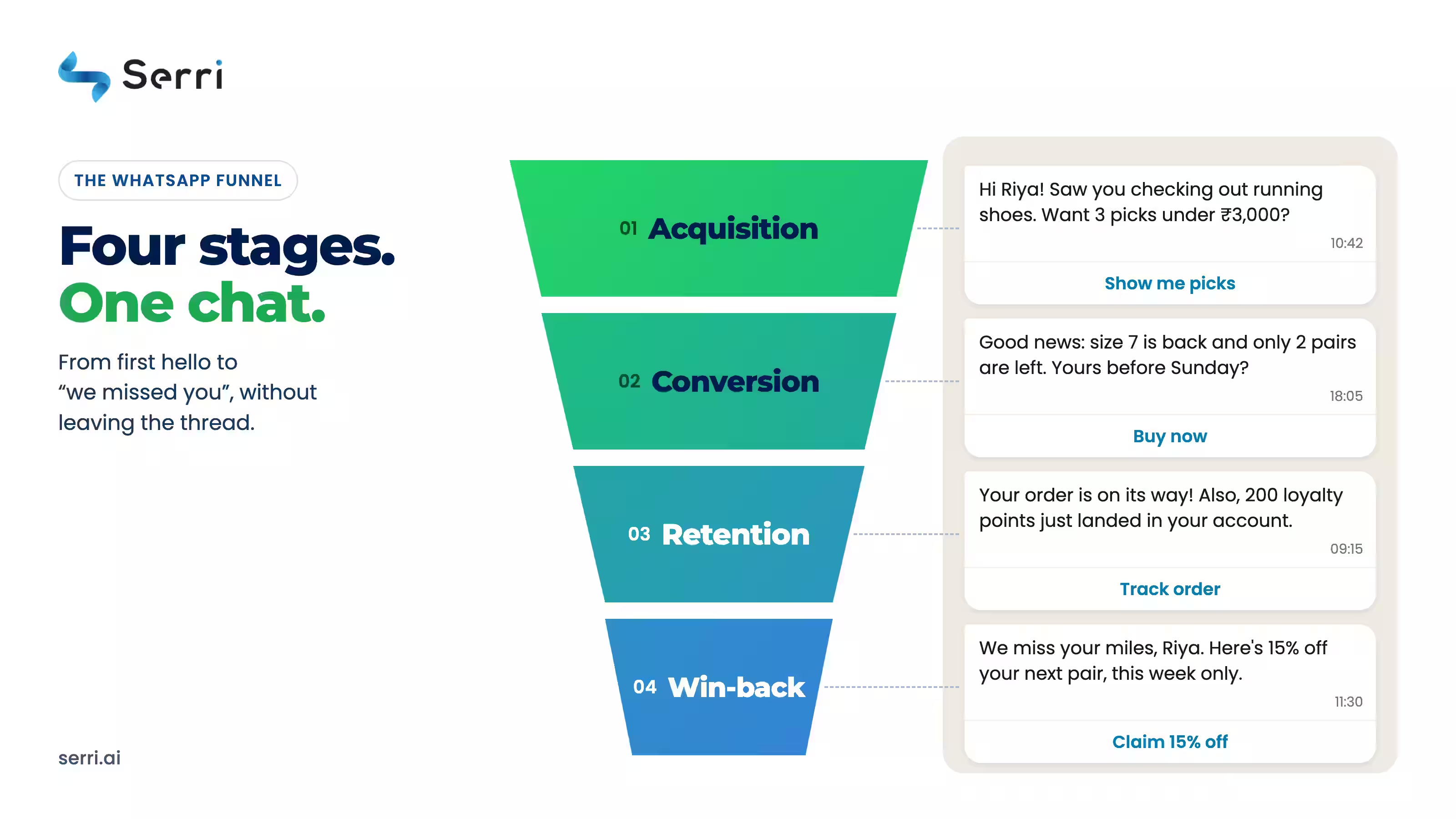
With WhatsApp marketing, you can send everything from launch announcements and limited-time offers to cart-recovery reminders, order updates, and win-back campaigns — the channel covers the entire customer journey, not just promotions. The same number that acquires a new customer also confirms their COD order and brings them back for the next purchase. Here’s what businesses send at each stage:
Stage | Examples |
|---|---|
Acquisition | Launch announcements, limited-time offers, lead magnets, waitlist activation |
Conversion | Abandoned-cart reminders, back-in-stock alerts, recommendations, COD/payment reminders — highest ROI, intent is proven |
Retention | Order confirmations, shipping updates, loyalty rewards, VIP offers |
Re-engagement | Win-back offers, new-collection nudges, feedback requests |
Support | FAQ chatbots, proactive issue alerts, post-purchase surveys |
Rich media lifts all of it: images, video, documents, carousels, quick-reply and CTA buttons, location sharing — interactivity SMS can’t match and email rarely achieves.
How Do WhatsApp Business App and WhatsApp Business Platform Differ, and Which Should a Buyer Choose Based on Business Size and Goals?
The Business App and Business Platform serve different needs. Choosing the wrong one will limit your growth.
WhatsApp Business App: For Manual, One-to-One Communication
What it is: A standalone mobile app that runs on a single phone number. You manage conversations manually, like regular WhatsApp but with business features.
Key features:
Quick replies (save common responses like "Our hours are 9-5")
Business hours (auto-reply when closed)
Labels (tag conversations as "sales," "support," "billing")
Catalogs (showcase products in a gallery view)
Away messages
No API integration, no automation
Cost: Free to download. No per-message charges.
Limitations:
One phone number, one person (or small team sharing one phone)
No broadcast campaigns
No automation or workflows
No CRM integration
No API access
Cannot scale beyond 50-100 conversations per day
Manual response required for every message
Best for:
Local service providers (plumbers, electricians, salons)
Freelancers and consultants
Retail shops with a small customer base
Startups doing manual customer service
Example: A wedding planner uses the Business App to manage client conversations on a single phone number. She replies manually to inquiries, shares catalogs of venues and packages, and sets away messages during off-hours.
WhatsApp Business Platform (API): For Campaigns, Automation, and Scale
What it is: Meta's enterprise API that connects to your CRM, marketing automation platform, and customer data systems. You send campaigns and automated workflows at scale.
Key features:
Broadcast campaigns to thousands of customers
Triggered automated workflows based on customer behavior
Rich media (carousels, buttons, videos, documents)
CRM and marketing automation integration
Advanced analytics and reporting
Quality rating system and throughput management
Multiple team members with role-based permissions
Sandbox testing environment
Webhooks for real-time customer replies
Limitations:
Requires business verification and API setup
More complex to implement
Ongoing compliance management
Requires monitoring of quality rating and throughput
Per-message costs add up at scale
Best for:
Ecommerce brands with 1000+ customers
D2C companies running marketing campaigns
SaaS platforms with automated customer journeys
SMBs that want to scale beyond manual responses
Businesses integrating WhatsApp into broader marketing stacks
Example: An ecommerce brand uses the Business Platform to send abandoned cart reminders 1 hour after a customer leaves their site, then again 24 hours later. The workflow is triggered automatically by a Shopify integration, personalized with the customer's name and product image, and responds to customer replies with a chatbot.
Decision Framework: Which Should You Choose?
Choose the Business App if:
You have fewer than 100 customers
You are managing conversations manually
You do not need marketing campaigns or automation
You want zero setup complexity
You have a single team member handling all communication
Choose the Business Platform if:
You have 1000+ customers
You want to run marketing campaigns
You want automated workflows and customer journeys
You want to integrate with your CRM or marketing automation platform
You have a team managing WhatsApp communication
You want analytics, segmentation, and personalization
Frequently asked questions
Do I need the WhatsApp API for marketing?
Businesses collect explicit opt-in, send Meta-approved template messages through the WhatsApp Business API, and engage replies in two-way conversations. Campaigns span broadcasts and automated journeys like cart recovery and order updates, measured on reply and conversion rates.
Do I need the WhatsApp API for marketing?
Yes you need WhatsApp API to market at a scale. The free Business App caps broadcasts at 256 saved contacts with no automation, integrations, or analytics. Real campaigns run on the Business Platform, accessed through a Meta Tech Partner like Serri — no coding needed.
How much does WhatsApp marketing cost in 2026?
Meta charges per delivered message — template messages by category and country (marketing costs most), and service replies beyond a monthly free allowance per business number. Incoming customer messages are free, and conversations from Click-to-WhatsApp ads get a free messaging window of up to 7 days. Platforms like Serri charge a separate subscription.


